Saturday, 16 March 2013

7Day Roguelike Challenge Complete!


OK time to release.
Download: http://7drl.org/wp-content/uploads/2013/03/bughack.zip

I'm a bit exhausted from working on it so I'll just paste the README.

Welcome to BUGHACK.

The idea for the game was to include roguelike mechanics based on how ants find food through scents.

You are a leader ant who must lead worker ants to delicious harvest. Every sector you must gather a certain amount of harvest. Keep your ants safe, or you'll take damage! You must call ants out of an ant hole and then lead them to to fruit.

Press C in-game to see controls.

THE GAME IS TOO SMALL:
To fullscreen, hit F in game.
Alternatively, replace the occurrence tiles12x12_gs_ro.png in bughack.py with tiles18x18_gs_ro.png

Dependencies:
Python 2.X (32 bit is needed on windows)
SDL (included in Windows, needed on Linux)

RUNNING:
python main.py
(Or on windows, right click main.py and run with python 2)

Created by:
 Programming by ludamad (Adam Domurad), art by REZ (Clay Bullard)

Friday, 8 March 2013

7DayRL Competition!


http://7drl.roguetemple.com/img/7drl.png


OK, this will look silly in case I don't complete, but I will be joining the 7day roguelike competition!

I will be teaming up with putterson (who does occasional work on lanarts with me) and REZ (who I previously did a Halloween competition with, resulting in Carny Death Peddlers). The hope is to have a tiles-mode with ASCII.

I'll say at this point to save myself from potential foolishness that any potential failing of the competition will be due to being too ambitious with too little free time, and not because of lack of interest!

Anyway, cautiously optimistic.

I'd discuss the game idea but they're going to change a buttload -- and we'll find out soon enough, ain't it ?

So plans are to use libtcod & Python. It won't be my first game in Python but it'll be my first graphical one. So far just learning libtcod and going through the tutorials, but I find it straight-forward. It's funny how well suited libtcod is for this competition.

Monday, 4 March 2013

Lanarts Update March 4th, 2013

New release, ready for download!

It is recommended you move with WASD, melee with H, fire spells with YUIOP, mouse controls for everything else.
Mouse controls for spells are fairly suboptimal at the moment.

Additionally, 1 to 9 for inventory slots 1 through 9.
Right click is needed to drop items, however.


So it's been 2 months since I felt like compiling this thing on Windows ... damn. About time for another lanarts release !
I hope sincerely to go back to a biweekly release schedule.

Major changes:
  • Enemies now do not regen health a bit after hit. This makes enemy packs a lot less annoying. [Credit for idea goes to serprex]
  • Floating point strictness flags turned out to help a lot with the remaining syncing issues.
  • Saving the game is much more streamlined -- now you simply need to exit (via shift+escape) and the game will automatically save. Reload the game and hit Continue (or enter), and your game is loaded. I feel comfortable having this the default now since I haven't run into any save-file bugs in a good amount of time.
  • Victory screen added, you can win the game now !
  • Scoreboard added, with stats for your previous characters, whether you won, etc. Navigate it with arrow keys/pageup&down if you have a lot of entries.
Minor changes:
  • Made it easier to distinguish walls and floor in the brick&hive tileset
  • A lot more code was brought to the lua side, including the menu implementation. The scripting is becoming quite mature, and the game much more engine-like. Documentation to come !
  • Unit tests moved fully to use UnitTest++
  • Network debug mode was fixed, logging was made more verbose. Diff'ing logs proved to be very effective rooting out syncing issues.
  • Game pausing and the steps_per_draw setting work again.
  • Minor balancing to spells
  • Added key display overlay for spells, and FPS counter in corner
  • Moved the wide-open and difficult floor 4 layout to floor 7
  • More options for hosting games, and the server's options now override client options (whereas before they could be weirdly out of sync)
Special thanks to putterson for all the online & LAN testing.

Windows:
Download!

Linux:
I do not yet provide linux packages, please do kick me if they'd be useful for you.

git clone http://github.com/ludamad/lanarts --depth 1
./run.sh

If you are missing dependencies on Linux (probably the case) please run either fedora-deps.sh for Fedora, or debian-deps.sh for Debian or Ubuntu.

Feedback

Please direct any bugs and inqueries either as a github issue, a comment on this blog, a post on the #lanarts freenode channel, or an email to domuradical@gmail.com. Feedback very welcome !

Tuesday, 12 February 2013

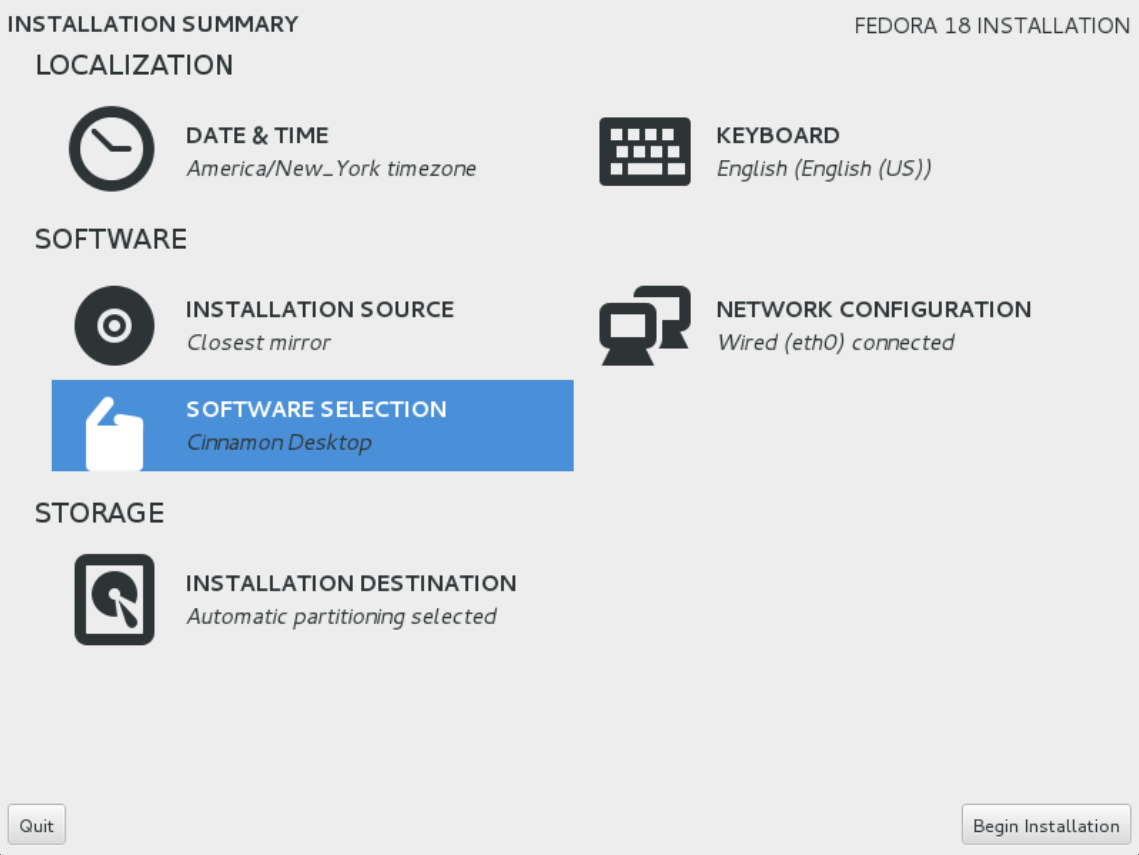
Fedora 18+Cinnamon

So, I had told myself I'd get use to Linux prior to coming to Red Hat, but truthfully that wasn't much needed. You learn fast when you're thrown in, and its sink or swim.

So, Fedora 16 was my first Linux distribution. I liked it a lot. I liked GNOME 3 a lot. With Fedora 16's end-of-life approaching (today, in fact) it was time to jump ship. GNOME 3 was nice enough, but I decided to put some of the noise about it in perspective and try something else.

Installing


Noticeably worse - a bit sad because obviously a lot of work was put into it. The new layout shows you all your options at once, but I think stepping you through them was more user-friendly.  Partitioning was confusing but in the end, it all worked well. Once I figured out I had to click on my F16 install, and hit a 'minus sign', everything went smoothly.

GNOME 3.6 Visuals, Graphical boot loader, etc

This probably impressed me more than it should have, but everything looked really tight to me. The fedora boot loader has a graphical back-drop, the login screen looks really nice, as were the various GNOME3 visual improvements. All of it fit together really nicely. Of course, at the end of the day, I would happily turn off any of these things for a better workflow. It sure is nice when people ask 'Whats this Linux thing?', and you have something shiny to show them.

Bugs

So once I tried to get some real work, I was unhappy to find a lot of small Eclipse issues. While F18 can only be blamed for bugs in Eclipse to a limited extent, it is one of those 'too big to fail' applications these days, so its worth mentioning. Without going into detail, these included issues with Java perspective not showing up after installing Eclipse Java Tools, and various graphical glitches using Eclipse C++ Tools. A more fundamental bug occurred when I tried to turn on desktop icons in GNOME 3.6 - instant crash, and crashing whenever I logged in.

Cinnamon!
The best thing about failing to get icons working on GNOME (admittedly I didn't try hard) was the decision to try out if they worked with Cinnamon. First off, I was very impressed with how well Cinnamon integrated with the whole Fedora user experience. Not only did a single yum command and a 'cinnamon --replace' have me trying it out in seconds flat, it was very simple to make my default desktop environment (toggle on log-in).

For someone like me that found GNOME 3's visually appealing, Cinnamon was perfect. Very soon I got rid of that 'hot corner' that GNOME 3 is so centered on, and set up some settings to my liking. Overall I find it more featureful, perhaps more Windows-like, but I'm not complaining.

Some things I do miss though is the nice way of dragging windows into workspaces with GNOME 3, and the 'application-centric' alt-tab that groups windows based on application.

Anyway, that's it for now. Overall I really like it, but then again I would have just been happy to get up to date packages again. YMMV.

Saturday, 2 February 2013

A Lesson from Java's Swing

So whenever possible, I like to apply things I learn in my hobby programming to my professional programming. Conversely though, sometimes I am inspired by the design of parts of icedtea-web (the project I work on at Red Hat). To be fair, this is more the design of Java's Swing library, but it got me thinking.

The menu code in Lanarts was pragmatic but also hackish. It piggy-backed the normal event loop and each menu was a pseudo-level. That meant there was a bunch of classes that inherited from GameInst that were only part of the menu code. The menu code was created based off these objects being planted into the pseudo-level, configured with callbacks to wire the menu logic and drawing, and just enough menu placement logic code so that things were spaced sanely on different resolutions.

Taking a Swing at a better design

Although it wasn't the first time I used Swing, recently while having to assemble a dialogue box with nothing but Swing layout managers, it struck me that this could be a good approach for Lanarts user interfaces. While Swing has a large number of obscure layouts, a comment struck me that I forget the source of: "Using GridLayout and BorderLayout you can create pretty much any interface". So I coded the equivalent of these in Lua. This resulted in two small classes:

1. InstanceLine:
Arranges objects in rows, this is similar to Java's GridLayout, but is designed to be especially convenient if you just want a single row.
2. InstanceBox:
Objects are added based on relative position; a value 0 to 1 is used for x & y coordinates. Using this layout you can easily align something against the center-top of a box, and another component on the center-bottom, for example.
Using these classes nested together, flexible layouts can be created with a lot less mucking around with coordinates. The x & y positions of each menu component are now calculated each time they are drawn, instead of being fixed absolute values. This allows each layout to only store relative positions, making logic simpler. As well components can be created without their locations having to be known at the time of creation.

The GameInst structure was abandoned as well, and instead a simple event loop was created in Lua.

It was really fun to code, and ended up being a large improvement. Here is a picture of the result with debugging code turned on:


Note this looks exactly like it did before -- not bad for a complete reprogramming in Lua!

The elegance with which it could be programmed made me feel a lot more confident in Lanarts ability to act as an effective moddable engine. I was able to code it in Lua with only take very brief breaks to quickly add a missing function or two on the C++ side.

One surprising inspiration I got is to have a similar mechanism for the level generation. A nested tree of randomly generated layouts could produce very interesting results!

Thursday, 24 January 2013

Lua & Lanarts

So lately I have been making some significant progress on the Lua side of Lanarts. Here's some summary!

LuaWrap, my pet Lua binder

After much frustration with existing Lua binding solutions (manual bindings, LuaBind, SimpleLuaBinder) I decided like any arrogant programmer to simply write my own. Of course, since I wrote it from the ground up, it suits my use-case quite well.

It is fairly small (24 short source files), flexible, and does not try to control your Lua environment in any way like SLB does. As well, although some performance was traded for ease-of-use, it provides an easy to use interface to eg Lua tables that suffers no performance penalties (assuming sufficient inlining). Here's an example of binding a global variable that should compile to the same code as if written by hand:

void bind_globals(lua_State* L) {
     LuaSpecialValue globals = luawrap::globals(L);

     globals["foo"] = "bar";
     globals["baz"] = 1;
}

LuaWrap is located in the lanarts source-tree under src/luawrap/. It does not depend on any libraries other than Lua.

Rewriting the main loop

So I wanted to move more towards having Lanarts as a game engine controlled by Lua. Now I definitely treat this as the compromise that it is -- it is perfectly possible to write a game in Lua, and that is not the goal. The plan is to allow people to modify the game very flexible in Lua without worrying about the networking aspect (except possibly for very heavy modification). The hope is that will inspire experimentation with the game mechanics.

So, as a start to this direction, I rewrote the main loop in Lua. Here's a look at the inside of the loop!

function main()
    net.sync_message_consume()

    local timer = timer_create()

    if not steponly then
        game.draw()
    end

    if not game.step() then 
        return false 
    end

    if not game.input_handle() then 
        return false 
    end

    local surplus = settings.time_per_step - timer:get_milliseconds()

    if surplus > 0 then 
        game.wait(surplus) 
    end

    return true
end

Object-Oriented Lua!

Figuring I'd continue this top-down approach, I have begun working on porting some of the menu code in Lua. For the first time, this actually meant I wanted to write something object-oriented on the Lua side! Now, OOP isn't a silver bullet, and I always like to weigh the pros & cons of other solutions -- but for graphical interfaces I think object orientation makes a lot of sense.

The first task I had was to decide on an object model. Now I think this is a really cool part of Lua -- it does not impose an object model on you. I settled on a very simple syntax, a single function 'newtype' returns a table suitable for use a 'type'. After which you simply add methods to the type. A special method, the 'init' method, is used to form a 'create' function. Here's what this looks like in action!

import "utils.lua" -- imports 'do_nothing'

TextLabel = newtype()

function TextLabel:init(font, options, text)
    self.font = font
    self.options = options
    self.text = text
end

TextLabel.step = do_nothing

function TextLabel:draw(xy)
    self.font:draw( self.options, xy, self.text )
end

-- Example usage
mylabel = TextLabel.create(font, options, text)

Some things notable here that highlight features of Lua:
  1. For people coming from a Python background, 'import' seems like a Lua keyword. Actually, it's a function that is being called with a string literal. Lua allows this syntax for one-argument table & string literal functions.
  2. 'function TextLabel:draw(xy)' is equivalent to 'function TextLabel.draw(self, xy)'. The colon operator is nothing more than syntax sugar for 'pass self as first parameter'.
  3. Lua silently (for better, or for worse!) ignores extra parameters, allowing a generic 'do_nothing' function like the one used.
 Anyway, that's all for today! Just wanted to give an update as I take a break from gameplay-oriented updates, and the dreaded mess of implementing client-side prediction. Stay tuned.

Sunday, 30 December 2012

My Year of Game Development

TL;DR? It's new years, and the first release of lanarts in 3 months! 
Download: here!
Github link

I believe I've grown a lot as a programmer in the past year. My knowledge of version control has expanded greatly -- from initially using SVN as little more than a file drop. I've moved from using windows exclusively to using linux exclusively. I started working at Red Hat this summer and learned much about real-world code (for the curious, I'm on the OpenJDK team, working on icedtea-web).

I decided to write a retrospective on my past year of game development on lanarts, I hope you enjoy it.

... Though to be honest, I didn't feel I could do it justice without some additional background pre-2012.

Pre(r)amble    Game Maker days

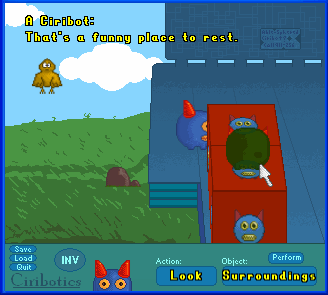
http://www.64digits.com/users/ludamad/CirboticsGIF4.gif

A game from my Game Maker days


I started programming by making games in Game Maker, although I have sworn off the program years ago. Since then I found that programming was fascinating in itself, and perhaps more so without annoying user interaction to worry about. In that time I did a great deal of hobby C++ programming, and some Java.

I started to enjoy working on large projects, namely a python-like scripting language. While very interesting, this proved to be unremarkable to my friends. So I thought, developing games again would be nice.

Summer 2011    From zerglings to witches and wizardry

My roommate was interested in collaborating on a project, and so we set off to make an RTS that was centered around LAN play. Lanarts. Somehow this idea got dropped, and instead we opted to make an RPG. The name stuck.

The first thing I did was toy around with level-generation code. It was quite simple, just plop down some rooms and tunnel between them randomly (backtracking on failure), but it worked well -- the code in place still stems from this.

After that I sought out find tiles to graphically display this dungeon, and found the rltiles tile-set, and subsequently the rogue-like Dungeon Crawl which uses them in a heavily modified form. Much distraction ensued! Soon me and Pat were playing Dungeon Crawl more than coding. However at the end of all the dungeon-diving my vision was clear, to make a game that could closely resemble a co-op roguelike as possible. 

Fall Semester 2011
    The foundations of a game

I used SVN & CMake in a research project during a research position I had during summer 2011, so they were natural choices for me to use in my game. Pat was using linux exclusively, while I was on windows, and this was a very good thing to tackle from day 1. In retrospect I wish I had also handled networking issues from this point as well.

Work on the engine progressed. I had the foundation of a game engine going in C++. OpenGL drawing, game actors acting in an event loop, and a rather complicated actor-storing data-structure that, while tricky to write, I still use and has worked very well.

January 2012    Movin' to git

Why git ?

I was fed up with using TortoiseSVN, and Pat convinced me to get a google-code account and try out a better version control system.

Features at this point
Basic .BMP loading, OpenGL drawing, font loading with FreeType, a minimap, collision system, field-of-view, keyboard controls.

No gameplay ... yet!

February 2012    It's alive!

Initial Development

The game progressed with some additional sprites hard-coded into the game, which now could be any image format and not just .BMP. A single enemy was added, able to path-find to the player. It could be killed with a simple ranged attack. A fog-of-war outside of the field-of-view was implemented; the map no longer starts revealed.

March 2012    It's a game!

Adding Gameplay
The game progressed by leaps and bounds this month. Enemies could attack, and 4 different kinds of enemies were introduced (all still in the game!). The level generation was tuned further and levels were given distinct layouts. An inventory was added, basic items such as HP & MP potions, as well as basic stats such as experience points and levels, and damage. No death animations were present yet, and melee attacking was preformed by simply walking into enemies, much like typical rogue-likes.

April 2012    It's an online game!


Taking it 2-Player
The game became even more game-like, with weapons, scrolls, and an additional spell (in addition to blinking and fireball which were already in). Monsters were no longer melee-attacked by walking into them, instead requiring a key press. Enemies get stronger by a fixed formula the deeper you go. Online was implemented! It was fraught with problems - crashes and synchronization issues - but the game could be played with 2 people!

May 2012

Online was further stabilized, projectile items added, additional tilesets, a game-chat bar that features notifications. Many new enemies.

June 2012
    First blog post!

Overhaul of stat system to one used currently, many new enemies including a set of animals, and two bosses. Many UI improvements, addition of weapons such as bows, early prototype of fighter class. Added visual representation of resting-system. Enemies travel in groups nicely thanks to the RVO2 library.

July 2012


Fighter class fully added, with separate sprite, and berserk spell. New tabs added to the interface. Stats displayed more nicely. Arbitrary numbers of players were added. Moved to github, where the code currently resides. Mostly fail at attempts to get additional developer interest.


August 2012    ... More than 2 players!

Shops were added. New archer class hastily added, was quite underpowered. Continue to look for help on the game, without much luck.

September 2012   ... ARRP, last official release (until today!)


The game was released for the ARRP. See this playthrough! The equipment system was redone with many new equipment slots. The main-screen was redone to allow for setting IP and connection port cleanly without fiddling with resource files. Work started on a new game, Carny Death Peddlers, with and old partner-in-crime, REZ, from my Game Maker days. The ability to work with a brilliant pixel artist was too enticing -- even if the project was forced to use Game Maker...
 
October 2012
    ... And Carny Death Peddlers is finished!

Frantic game development, in time for Halloween!
The game was successfully finished within a month-and-a-half for a Halloween-themed game development contest. I think it's obvious that this is a very small timeframe to complete a game. The dedication that my artist partner REZ showed for completing the project kept me on-task. There was definitely many stressful periods but I've never worked on a game with someone with such unified vision, it was awesome! The game has since been featured on several gaming websites such as GameJolt, and has ~1000 downloads on 64Digits.com. The game features great original music by Glock&Mr8bit. 

 November & December 2012    ... A needed break, and then back at it

Engine improvements
After the release of the last game I was a bit burned out. However, creating a full game in such short amount of time was inspiring to reapply my efforts towards polishing Lanarts. Glock&Mr8bit and REZ both agreed to help with the game. Unfortunately, REZ soon became busy with his own projects. Glock&Mr8bit worked away at producing music, and I worked on improving the engine in various ways, such as being able to play sound effects and music, and a better Lua framework. Still looking for additional developers.

Download: here!

This release features:
  • Lots of balancing work
  • Lots of new items, with new items added for practically every equipment slot.
  • Two new enemies, a centaur who keeps his distance, and a hydra whose head count represents its remaining HP (a future change will make these more like the 'cut off one head two grow back' hydras of legend).
  • A new fighter ability - 'Power Strike', an attack that hits multiple enemies in an area with your weapon, and also knocks them back with a temporary stun. Gained at level 3.
  • Interface improvements, better auto-equip logic when switching equipping projectiles & projectile-using weapons. Spells that are typically used once and then switched to melee no longer default to melee when their key is held. You are now able to use spells without first switching to them (previously two keystrokes were needed to use a not-selected spell).